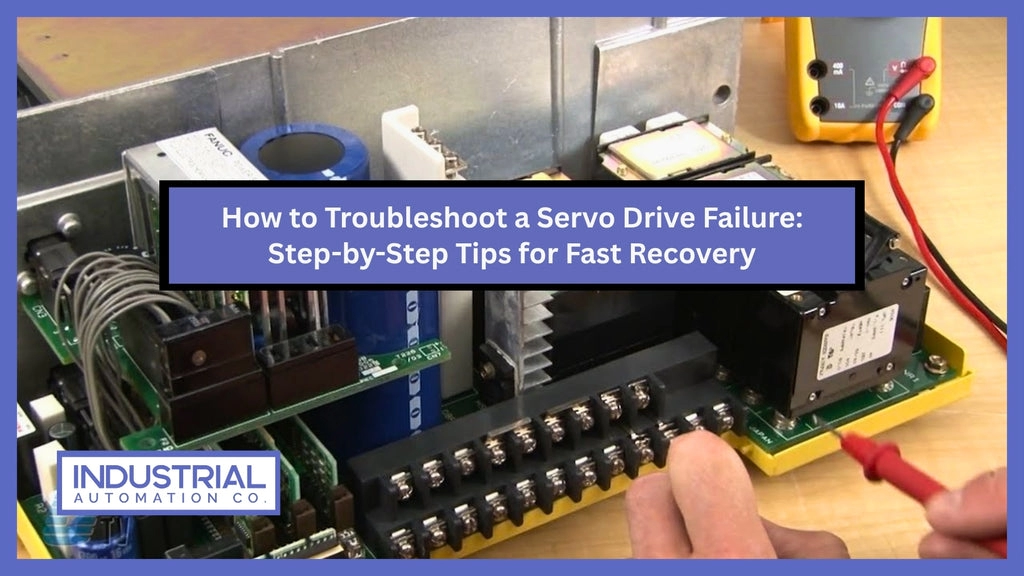
Si votre servomoteur est en train d'agir - s'il ne bouge pas, frousse, ou déclencher des alarmes : chaque seconde d'arrêt vous coûte de l'argent. La bonne nouvelle? Le plus courant problèmes de servomoteur sont faciles à identifier et à réparer si vous suivez les bonnes étapes. Dans ce guide, tu auras 8 conseils pour résoudre les problèmes de servomoteur qui fonctionnent avec des marques comme Doumi, Yaskawa, Mitsubishi, et Siemens. Pas de peluches, pas de théorie, juste vite, pratique, des actions étape par étape que vous pouvez entreprendre directement dans votre atelier pour trouver et résoudre rapidement les problèmes. Tenez-vous en à cette liste de contrôle, et tu élimineras 90% de défauts en dessous 30 minutes. Allons-y et remettons votre servo sur la bonne voie.
Vérifiez d'abord la stabilité de l'alimentation électrique
Les problèmes d'alimentation sont la cause la plus fréquente de l'immobilité du servomoteur ou d'un comportement irrégulier.. Commencez par vérifier votre alimentation, si elle est instable, tout le reste s'effondre.
Surveillez ces symptômes liés à l’alimentation:
- Jitter du servo ou arrêt aléatoire
- Codes d'alarme fréquents du servomoteur sans cause claire
- Le moteur ronronne mais ne tourne pas
- Réinitialisations ou arrêts inattendus
Assurez-vous de vérifier soigneusement les niveaux de tension. Mesure tension d'alimentation principale et 24 VCC ou 48 Puissance de contrôle VCC séparément : ils remplissent des fonctions différentes et nécessitent leur propre vérification.
Comment vérifier correctement l'alimentation de votre équipement:
- Utilisez un multimètre pour vérifier que les niveaux de tension CC sont conformes aux spécifications.
- Pour l'ondulation ou le bruit, utiliser un oscilloscope pour repérer les fluctuations de tension qu'un multimètre ne peut pas détecter.
- Test sous charge, car des ondulations et des chutes peuvent n'apparaître que lorsque le moteur tourne..
Erreur courante: Ne confondez pas puissance principale (la haute tension qui entraîne le moteur) avec puissance logique (la basse tension alimentant la carte variateur/contrôle). Les deux doivent être stables, mais vérifier le mauvais peut vous conduire sur le mauvais chemin.
En confirmant d'abord que votre alimentation est stable et propre, vous éviterez de perdre du temps à chercher des problèmes fantômes plus tard. Si vous constatez des anomalies, corrigez-les avant de passer à l’étape de dépannage suivante.
Inspecter tous les câblages et connexions (Le #1 Cause des échecs)
Le câblage et les connexions sont les coupables les plus courants lorsque votre servomoteur ne bouge pas ou présente des vibrations.. Commencez par vérifier s'il y a des câbles desserrés ou oxydés – lignes électriques, câbles de retour d'encodeur, et les connexions de frein peuvent toutes perdre le contact ou se dégrader avec le temps.
Ne négligez pas le blindage et la mise à la terre appropriée, soit. Les boucles de masse sont une cause sournoise de gigue des servos et de comportement erratique. Assurez-vous que les blindages des câbles sont correctement connectés et que la mise à la terre suit les meilleures pratiques de votre système..
Un rapide, le test de sécurité consiste à remuer doucement les câbles pendant que le servo est sous tension. Si le moteur tremble ou si des alarmes apparaissent pendant cette, vous avez trouvé une connexion suspecte.
Enfin, serrer les borniers aux couples recommandés. Un serrage excessif peut endommager les connecteurs, mais un serrage insuffisant conduit au relâchement et à l'échec. Un couple approprié garantit un contact fiable dans tout le système.
Pour en savoir plus sur les meilleures pratiques de câblage et les éléments essentiels du contrôle moteur, consultez cette ressource d'automatisation industrielle de Doumi.
Recherchez une surchauffe et un arrêt thermique
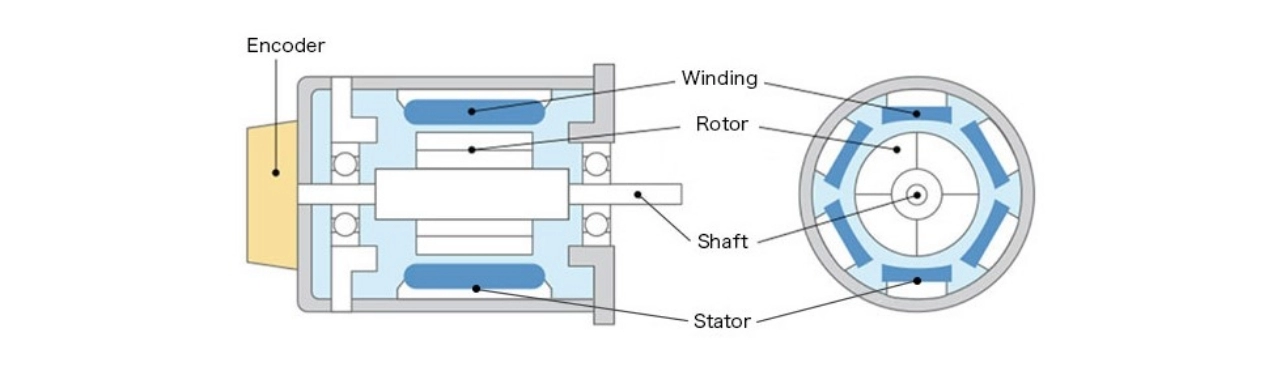
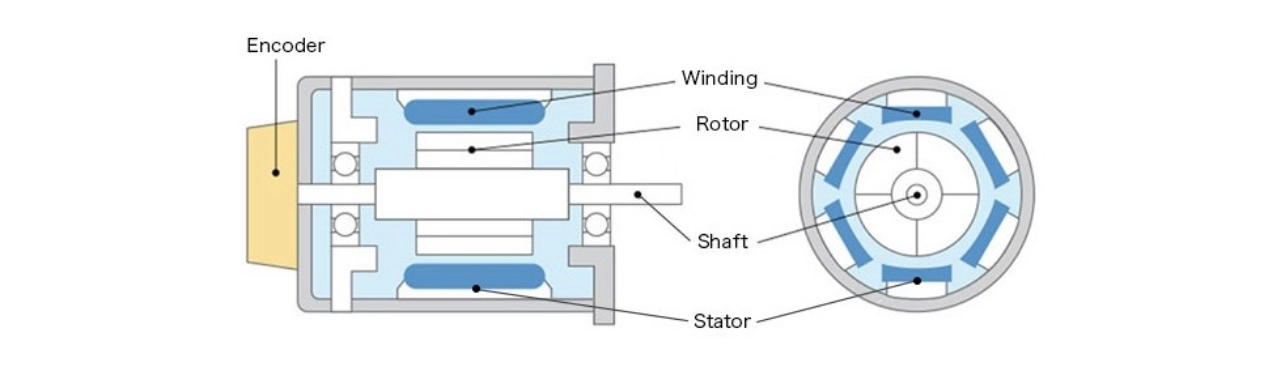
La surchauffe est une cause fréquente de problèmes de servomoteur, conduisant souvent à des arrêts thermiques qui arrêtent votre système de manière inattendue. Connaître la plage de température normale de votre moteur est essentiel, généralement, le moteur doit tourner à une température inférieure à 80°C (176°F). Les températures supérieures à cette plage peuvent signaler un problème, surtout s'il déclenche des alarmes ou déclenche la protection thermique.
Commencez par nettoyer les dissipateurs thermiques et assurez-vous que les ventilateurs de refroidissement fonctionnent correctement. L'accumulation de poussière ou un ventilateur défectueux peut réduire considérablement l'efficacité du refroidissement.. Si votre moteur fonctionne dans un environnement chaud, au-dessus de 40°C (104°F)— vous devez réduire la capacité de charge du moteur pour éviter la surchauffe. Ce déclassement évite un arrêt thermique prématuré et prolonge la durée de vie du moteur.
Aussi, familiarisez-vous avec les codes d’erreur thermique de votre disque. Ces codes aident à déterminer si le défaut vient de l'enroulement du moteur, le lecteur lui-même, ou des conditions externes affectant l'accumulation de chaleur. En surveillant ces conditions de près, vous pouvez éviter les problèmes de surchauffe avant qu'ils ne causent de graves dommages.
Pour plus d’informations techniques sur les systèmes d’entraînement qui gèrent efficacement la gestion thermique, découvrez des options de haute qualité comme le Delta Drive série ASD-A2.
Vérifiez le dispositif de rétroaction (Encodeur ou résolveur)
La plupart des problèmes intermittents de servomoteurs proviennent de pannes d'encodeur. Si vous remarquez des symptômes tels qu'une dérive de position, erreurs suivantes, ou alarmes étiquetées A, C, ou E sur votre servo variateur, le dispositif de rétroaction est souvent le coupable. Ces erreurs peuvent perturber le contrôle précis du moteur et provoquer une instabilité ou des arrêts inattendus.
Pour codeurs absolus, assurez-vous que la tension de secours de la batterie est stable, si la batterie est faible ou morte, le codeur peut perdre sa référence de position en cas de perte de puissance, conduisant à des erreurs au démarrage.
Un moyen rapide de tester l'encodeur consiste à utiliser l'écran de diagnostic du variateur.. Cet outil permet de vérifier la qualité du signal de retour et de détecter toute irrégularité sans avoir besoin d'équipement supplémentaire..
Si vous utilisez des produits tels que les composants de la série Siemens 3SU1500, assurez-vous que le câblage de l'encodeur correspond aux spécifications pour éviter les pannes courantes. Pour un dépannage détaillé, vous voudrez peut-être également vous pencher sur les variateurs ABB ACS550 compatibles, qui comportent des fonctions de diagnostic intégrées adaptées aux dispositifs de rétroaction.
Vérifier et réinitialiser le contrôleur & Paramètres du lecteur
Des paramètres incorrects du contrôleur et du variateur sont une cause fréquente de problèmes de servomoteur tels que l'oscillation., aucun mouvement, ou fonctionnement instable. Les paramètres clés à vérifier incluent:
- Rapport d'inertie: Une inadéquation peut provoquer des mouvements lents ou saccadés.
- Paramètres de gain: Un réglage incorrect entraîne une gigue ou une chasse du servo.
- Rapport de vitesse électronique: Des valeurs incorrectes provoquent des erreurs de position ou des blocages.
Sauvegarde rapide des paramètres avant les modifications
Sauvegardez toujours les paramètres actuels avant d’apporter des modifications. Utilisez l'outil de diagnostic du variateur ou l'interface du contrôleur pour exporter les paramètres vers un fichier ou une mémoire.. Cela vous permet de restaurer les valeurs de travail si nécessaire.
| Problème de paramètre commun |
Symptôme |
Réparer |
| Rapport d'inertie incorrect |
Dépasser, oscillation |
Ajuster en fonction du moteur et de la charge |
| Gains trop élevés/faibles |
Gigue du servo ou réponse lente |
Ajustez les gains progressivement |
| Rapport de démultiplication incorrect |
Aucun mouvement, erreurs de position |
Vérifier et corriger le rapport de démultiplication |
Si votre lecteur le prend en charge, consulter le manuel ou le logiciel du contrôleur pour connaître les paramètres par défaut recommandés et les procédures de réinitialisation. Pour un dépannage avancé, vérifier les codes d'alarme et les listes de paramètres avant de réinitialiser.
Pour en savoir plus sur le contrôle et le dépannage des appareils d'automatisation, explorer les ressources sur contrôles d'automatisation industrielle.
Détecter les liaisons mécaniques ou les charges excessives
Une liaison mécanique ou une charge excessive est une cause fréquente de problèmes de servomoteur tels que la gigue., stabulation, ou déclencheurs d'alarme. Commencez par vérifier le alignement de l'accouplement— des accouplements mal alignés peuvent provoquer une charge inégale et endommager l'arbre du moteur. Suivant, inspecter tension de la courroie; des courroies trop tendues ou trop lâches fatiguent le moteur ou glissent, affectant les performances. N'oubliez pas de chercher usure des roulements— des roulements endommagés peuvent créer une résistance qui ressemble à une charge accrue.
Pour identifier le problème, mesurer la charge réelle sur le moteur et comparez-le au couple nominal du moteur. Si la charge dépasse la capacité du moteur, ça peut causer alarmes de surcharge voire endommager le servo variateur. Souviens-toi, un alarme de surcharge signifie que le moteur combat trop de résistance mécanique, tandis qu'un alarme de surintensité indique des problèmes électriques comme un court-circuit ou un rotor calé.
Garder les pièces mécaniques en bon état garantit un fonctionnement fluide des servos et réduit les problèmes de dépannage..
Test du fonctionnement des freins (Selon l'équipement)
Si votre servomoteur bourdonne mais ne tourne pas, une cause commune est la 24 Le frein V ne se desserre pas correctement. Cela empêche l'arbre du moteur de tourner même si la puissance est appliquée..
Comment vérifier et relâcher manuellement le frein:
- Écoutez les clics: Lorsque l'alimentation est appliquée, tu devrais entendre le relâchement du frein.
- Relâchez manuellement le frein: Si c'est sûr, débrayez manuellement le frein pour voir si l'arbre du moteur bouge librement.
- Mesurer la résistance de la bobine: Utilisez un multimètre pour vérifier la résistance de la bobine de frein par rapport aux spécifications du fabricant.. Une bobine ouverte ou courte signifie généralement que l'unité de freinage doit être remplacée..
Modes typiques de défaillance des freins:
- Grillage de la bobine dû à une surchauffe ou une surtension.
- Collage mécanique dû à un matériau de friction usé.
- Saleté ou corrosion provoquant le blocage du frein.
Si le frein ne se desserre pas même après ces contrôles, il est probablement temps de le remplacer. Pour en savoir plus sur les composants servo fiables, Découvrez les pièces d'automatisation Siemens de confiance qui s'adaptent à de nombreux systèmes d'asservissement.
Tenir compte des facteurs environnementaux et des EMI
Les conditions environnementales peuvent sérieusement affecter les performances de votre servomoteur. Poussière, brouillard d'huile, fortes vibrations, et une humidité élevée sont des coupables courants qui provoquent des secousses ou un comportement erratique des servos.. Ces facteurs peuvent dégrader l'isolation, corroder les connecteurs, et provoquer des pannes électriques intermittentes au fil du temps.
Un autre gros problème est celui des interférences électromagnétiques (EMI), surtout si vos câbles passent trop près des variateurs de fréquence (VFD), machines à souder, ou tout autre équipement bruyant. Les EMI peuvent provoquer une défaillance du retour d'encodeur ou des codes d'alarme aléatoires du servomoteur difficiles à retracer..
Voici des solutions rapides pour minimiser les problèmes environnementaux et EMI:
- Utiliser noyaux de ferrite sur les câbles de signal et d'alimentation pour réduire le bruit haute fréquence.
- Garder câbles d'alimentation et câbles de retour séparés pour éviter les interférences.
- Éloignez les câbles des VFD ou des machines à souder autant que possible.
- Vérifiez à nouveau que les blindages des câbles sont correctement mis à la terre pour éviter les boucles de terre..
Pour des informations plus détaillées sur la réduction des interférences liées au VFD, consultez notre guide sur Intégration VFD et PLC pour assurer le bon fonctionnement de votre système d'asservissement dans des environnements exigeants.
Liste de contrôle de vérification rapide en prime (PDF téléchargeable offert via le site Doumi)
Pour vous faire gagner du temps lors du dépannage des problèmes de servomoteur, nous avons élaboré une liste de contrôle rapide qui couvre l'essentiel. Ce PDF pratique vous guide à travers des inspections rapides, des vérifications de l'alimentation électrique et du câblage aux dispositifs de rétroaction et aux problèmes mécaniques. C'est parfait pour les techniciens qui veulent un clair, aide étape par étape pour diagnostiquer les défauts courants et éviter les erreurs les plus fréquentes.
Ce qui est inclus dans la liste de contrôle?
- Vérifiez l’alimentation électrique stable et les niveaux de tension corrects
- Inspecter tous les états du câblage et des connecteurs
- Identifier les signes de surchauffe et de refroidissement adéquat
- Tester l'intégrité du retour d'encodeur
- Examinez et réinitialisez les paramètres du contrôleur en toute sécurité
- Détecter les problèmes de liaison mécanique ou de charge
- Confirmer le fonctionnement de la fonction de freinage
- Repérer les facteurs environnementaux affectant les performances
Vous pouvez trouver la liste de contrôle complète sur le site de Doumi, conçu spécialement pour les États-Unis. les utilisateurs ayant besoin de rapidité, conseils de dépannage fiables pour les servomoteurs. Gardez-le à portée de main sur votre appareil mobile ou imprimez-le pour rationaliser vos routines de maintenance..
Pour une aide plus approfondie sur les sélections ou les diagnostics de servomoteurs, découvrez la gamme de produits Doumi comme le Codeur Heidenhain ou Servomoteurs Mitsubishi, tous deux font confiance au secteur manufacturier américain.
Quand appeler le support technique de Doumi
Parfois, le dépannage atteint un point où le problème est probablement interne au servomoteur ou au variateur lui-même (pensez à une panne de l'IGBT), dommages à l'enroulement du moteur, ou défauts de composants internes. A ce stade, il est préférable d'appeler le support technique de Doumi pour obtenir l'aide d'un expert.
Quand tendre la main
- Persistant codes d'alarme du servo variateur cela ne s'efface pas après les réinitialisations
- Moteur fredonne mais ne bouge pas malgré un câblage et une alimentation corrects
- Cohérent échec du retour d'encodeur après avoir vérifié les câbles et les paramètres
- Avertissements de surchauffe non expliqués par des facteurs externes
- Vérifications mécaniques effectuées, mais problème comme tremblement des servos ou erreur suivante restes
Comment collecter des données avant d'appeler
Avoir les bonnes informations à portée de main accélère le diagnostic et la réparation. Préparez ceci avant d'appeler:
| Données nécessaires |
Description |
Pourquoi ça aide |
| Code d'alarme |
Messages d'erreur exacts affichés |
Identifie la pièce défectueuse du système |
| Liste des paramètres |
Paramètres actuels du moteur et du variateur |
Identifie un réglage de gain incorrect ou une inadéquation d'inertie |
| Photos |
Gros plans du câblage et de la configuration |
Vérifiez les connexions desserrées ou les dommages visibles. |
| Remarques environnementales |
Conditions ambiantes, changements récents |
Éliminez les causes externes telles que les EMI ou la surchauffe |
| Résultats des tests |
Multimètre, lectures d'oscilloscope |
Confirme la stabilité de l'alimentation ou les problèmes de câblage |
La préparation de ces détails vous garantit l'assistance la plus précise possible de la part des experts techniques de Doumi., minimiser les temps d’arrêt et les coûts de remplacement.
Pour une aide supplémentaire avec les servomoteurs comme le Mitsubishi HG-SR702B, vous pouvez consulter des informations détaillées sur le produit et les options d'assistance sur Page moteur Mitsubishi HG-SR702B.


 par
par