Communication Setup Between S7-1200 G2 and Midbus RTU
Siemens S7-1200 G2 PLC Communication Capabilities
When setting up communication between a Siemens S7-1200 G2 PLC and a Midbus RTU, understanding the PLC’s capabilities is crucial. The S7-1200 G2 supports Modbus RTU, serial protocols, and industrial Ethernet options. This flexibility allows it to connect with a wide range of field devices and RTUs. The PLC features built-in serial ports (RS-485/RS-232) and can be expanded with communication modules for additional protocol support.
Key features of S7-1200 G2 communication:
- Native Modbus RTU support for serial data exchange
- Configurable baud rates and parity settings
- Integrated diagnostics for quick troubleshooting
- Flexible addressing for multiple slave devices
Midbus RTU Protocol Integration Requirements
The Midbus RTU protocol is widely used for robust, reliable data transmission in industrial environments. Integrating it with the S7-1200 G2 requires matching protocol settings and addressing schemes. Midbus RTU typically operates over RS-485, using specific baud rates, parity, and stop bits. Both devices must be set to the same communication parameters to avoid data transmission errors.
Integration essentials:
- Consistent baud rate and parity settings on both PLC and RTU
- Correct slave/master configuration for Modbus RTU
- Proper memory mapping for data registers
- Shielded cabling to reduce interference
Typical Hardware and Network Configuration for S7-1200 G2 and Midbus RTU Connection
A reliable hardware setup is the foundation for successful PLC Modbus RTU communication. The S7-1200 G2 connects to the Midbus RTU via serial cabling, usually RS-485, which supports multi-drop networks and long cable runs.
Standard hardware and network configuration:
- RS-485 serial cable with proper termination resistors
- Dedicated communication module if additional ports are needed
- Power supply stability for both PLC and RTU devices
- Grounding and shielding to prevent signal interference
- TIA Portal configuration for setting communication parameters
In most US industrial automation setups, ensuring that wiring follows IEC and UL standards is essential for safety and reliability. Proper configuration at both ends—PLC and RTU—reduces the chance of communication faults and makes troubleshooting more straightforward.
Table: Key Setup Points
| Component |
S7-1200 G2 PLC |
Midbus RTU Device |
| Serial Protocol |
Modbus RTU (RS-485/232) |
Modbus RTU (RS-485) |
| Baud Rate |
9600 / 19200 / 38400 |
Must match PLC setting |
| Parity |
Even / Odd / None |
Must match PLC setting |
| Termination |
120 Ohm resistor |
120 Ohm resistor |
| Power Supply |
Stable 24V DC |
Stable 24V DC |
| Configuration Tool |
Siemens TIA Portal |
RTU vendor software |
By following these setup guidelines and understanding the communication requirements, you can avoid common S7-1200 G2 communication issues and ensure a smooth integration with Midbus RTU devices.
Common Communication Problems Between S7-1200 G2 and Midbus RTU
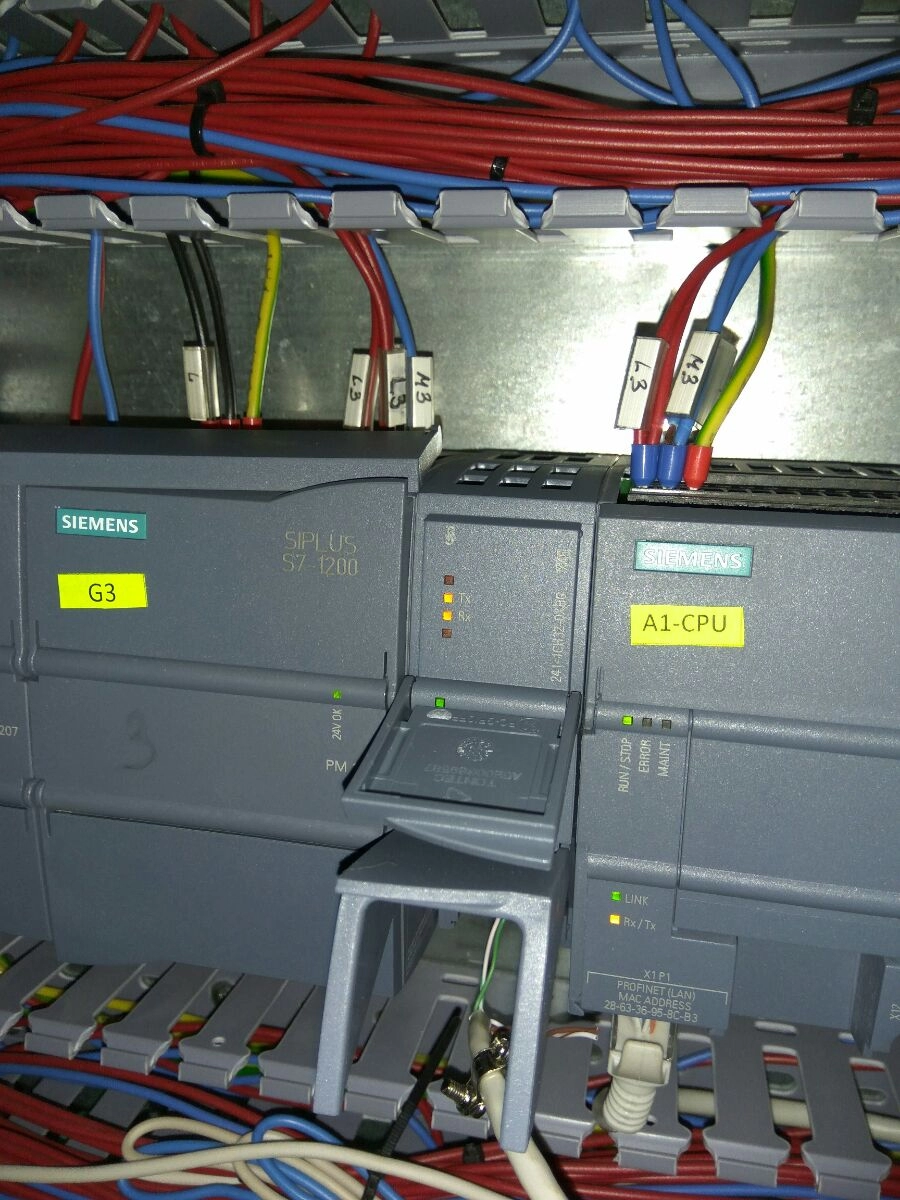
When you’re connecting a Siemens S7-1200 G2 PLC to a Midbus RTU, communication issues can pop up fast. Here’s a rundown of the most common problems that trip up data exchange and how they impact your industrial automation setup.
Signal Interference and Wiring Issues
- Noise and Interference: Industrial environments are rough. Motors, relays, and other gear throw off electrical noise, which can mess with your PLC to RTU signals.
- Poor Wiring: Loose terminals, bad crimps, or using the wrong cable type can kill your signal quality. Always use shielded cables and keep wiring short and tidy.
Protocol and Configuration Mismatch
- Protocol Confusion: The S7-1200 G2 often uses Modbus RTU for serial comms. If your Midbus RTU expects different settings (baud rate, parity, stop bits), nothing will sync up.
- Wrong Settings: Even a single mismatch in configuration—like a wrong slave address or function code—means no data moves.
Addressing and Memory Mapping Errors
- Address Mix-Ups: PLCs and RTUs need to agree on register addresses. If your S7-1200 G2 is polling the wrong memory spot, you’ll get errors or blank data.
- Data Type Conflicts: Mixing up data types (like INT vs. FLOAT) can scramble your numbers or crash the comms.
Power Supply and Reliability Issues
- Voltage Drops: If your PLC or RTU isn’t getting steady power, expect random disconnects.
- Ground Loops: Bad grounding can create feedback that disrupts serial communication.
Firmware and Software Compatibility
- Outdated Firmware: If your S7-1200 G2 or Midbus RTU is running old firmware, you might face compatibility issues, especially after a TIA Portal update.
- Unsupported Features: Some RTUs need specific features or command sets that older PLC firmware can’t handle.
Timing and Latency Problems
- Slow Response: If your network is overloaded or the devices aren’t tuned for the same timeout and retry settings, you’ll get lag or dropped connections.
- Buffer Overruns: Too much data at once can overwhelm the RTU or PLC, causing missed or corrupted messages.
If you’re working with specific modules, like the Siemens SIMATIC S7-1200 Digital Input Module or the S7-1200 CPU 1214C, make sure they’re compatible with your RTU’s requirements.
Bottom line: Most S7-1200 G2 Midbus RTU communication problems come down to setup details—wiring, protocol, firmware, and timing. Get these right, and your PLC-to-RTU data will flow smooth.
Diagnostic Steps for S7-1200 G2 Midbus RTU Communication Failure

When S7-1200 G2 PLCs have trouble talking to a Midbus RTU, you need a clear, step-by-step approach to zero in on what’s wrong. Here’s how I break down the troubleshooting process, based on real-world issues seen in US industrial settings.
Start with Physical Layer Checks
- Inspect all wiring and connectors. Loose or corroded terminals, broken wires, or poor crimp jobs cause most basic communication failures.
- Double-check cable types and lengths. For Modbus RTU, use shielded twisted pair cables, and keep runs within spec to avoid signal loss.
- Look for electrical noise sources. Motors, VFDs, and unshielded power cables nearby can interfere with clean data signals.
Use Siemens TIA Portal and Midbus RTU Diagnostic Tools
- Open TIA Portal and use its built-in diagnostics. It can quickly flag port errors, mismatched settings, or bus faults.
- Check the Midbus RTU’s monitoring functions. Many RTUs have onboard status pages or simple diagnostics that show error counts or status codes.
Analyze LED Status Indicators
- Check the PLC’s communication LEDs. Blinking patterns or solid lights can indicate if data is being sent, if there’s a fault, or if the port is idle.
- Review the RTU’s status lights. These often show power, comms activity, and error states at a glance.
Communication Logging and Packet Sniffing
- Use a serial data logger or protocol analyzer. This lets you see if messages are leaving the S7-1200 G2 and making it to the Midbus RTU (and vice versa).
- Look for CRC errors, timeouts, or garbled data. These point to wiring or protocol mismatches.
Verify Communication Parameters
- Double-check baud rate, parity, stop bits, and slave address on both devices. Even a small mismatch will block communication.
- Confirm protocol settings. S7-1200 G2 supports Modbus RTU, but you have to make sure both sides are set to the same mode (RTU, not ASCII or TCP).
- Review memory mapping and addressing. Make sure the PLC is polling the correct registers the RTU actually uses.
Pro tip: Many communication issues come down to a single setting or a small wiring fault. Take your time with these steps, and don’t skip the basics. If you’re still stuck, OUKECNC support can walk you through advanced diagnostics tailored to Siemens S7-1200 G2 and Midbus RTU setups.
Step by Step Troubleshooting Guide for PLC S7-1200 G2 Midbus RTU Communication Problem
When you’re facing Siemens S7-1200 G2 communication issues with a Midbus RTU, a systematic approach is the fastest way to get things back on track. Here’s how I tackle these problems in the field, step by step:
Check Hardware Connections and Wiring
- Inspect every wire and terminal. Loose or reversed wires are common causes of PLC to RTU data transmission errors.
- Make sure you’re using the right cable type and length. Shielded twisted pair cables help cut down on interference.
- Confirm the ground connections are solid—bad grounding leads to intermittent S7-1200 G2 serial communication problems.
Double Check Communication Protocol Settings
- Verify both devices are set to the same baud rate, parity, stop bits, and protocol mode (Modbus RTU is most common).
- Check the slave address on the Midbus RTU and make sure it matches your S7-1200 G2 configuration.
- If you’re using a Siemens communication processor, like the S7-1200 Communication Processor, confirm it’s set up correctly in TIA Portal.
Update Firmware and Software
- Outdated firmware is a sneaky cause of industrial automation communication faults.
- Update your S7-1200 G2 CPU and RTU firmware to the latest versions. Siemens regularly releases updates to fix PLC Modbus RTU troubleshooting headaches.
- Don’t forget to update your TIA Portal or engineering software.
Test Communication with Simple Commands
- Use TIA Portal’s built-in diagnostic tools to send basic read/write commands.
- If you get errors, try using a third-party Modbus RTU tester or a serial port monitor.
- Log the communication to spot addressing and memory mapping errors.
Monitor Network Traffic and Watch for Collisions
- Use a protocol analyzer or packet sniffer to see what’s happening on the line.
- Look for duplicate addresses or excessive retries, which point to network collisions or latency issues.
- Check for error codes in the S7-1200 G2 diagnostic buffer.
Reconfigure or Reset Devices
- If you’ve changed settings, power cycle both the PLC and RTU to apply changes.
- Try a factory reset if you suspect a configuration mismatch or corrupted memory.
- Re-upload your backup configuration and test again.
Contact Technical Support if Unresolved
- If you’re still stuck, reach out to Siemens, Midbus RTU, or your local automation distributor.
- Share your diagnostic logs, wiring diagrams, and firmware versions for faster help.
- Consider consulting with a specialist like OUKECNC for customized troubleshooting or to review your setup. They offer a range of S7-1200 modules and support that can help optimize your system.
Tip: Always document your steps and keep a backup of your working configuration. This makes future troubleshooting much easier and faster.
By following this guide, you’ll be able to resolve most S7-1200 G2 and Midbus RTU integration problems without a ton of downtime. If you need specific modules or accessories to improve your setup, check out OUKECNC’s lineup of Siemens S7-1200 modules for reliable hardware options.
Best Practices to Avoid PLC S7-1200 G2 Midbus RTU Communication Problems
When working with Siemens S7-1200 G2 PLCs and Midbus RTU devices, a few smart habits can save you from headaches down the road. Here’s what we recommend for smooth, reliable industrial automation communication:
Check Firmware and Hardware Compatibility
- Always match your firmware and hardware versions. Even small mismatches can cause S7-1200 G2 communication issues or make your Midbus RTU PLC integration problems worse.
- Before upgrades or replacements, double-check the compatibility lists from Siemens and your RTU supplier.
Stick to Official Communication Guidelines
- Follow Siemens and Midbus RTU manuals for setup. Don’t skip steps or use shortcuts, especially with PLC Modbus RTU troubleshooting.
- Use recommended settings for baud rate, parity, and stop bits. Configuration mismatches are a top cause of PLC to RTU data transmission errors.
Use Proper Cable Management and Shielding
- Route cables away from high-voltage lines and sources of interference. Signal interference is a common culprit in S7-1200 G2 serial communication problems.
- Use shielded cables and ground them correctly. This helps block electromagnetic noise and boosts communication reliability.
Schedule Regular Maintenance and Diagnostics
- Set a maintenance schedule to inspect wiring, connectors, and device health.
- Run diagnostics from Siemens TIA Portal and use Midbus RTU monitors to catch issues early.
- Keep an eye on communication logs for repeated errors or data delays.
Back Up and Document Everything
- Back up PLC and RTU configurations regularly. If something goes wrong, you’ll save time and avoid data loss.
- Document all changes—including wiring diagrams, firmware updates, and parameter tweaks. This makes troubleshooting Siemens PLC communication much easier for anyone on your team.
Quick Reference Table
| Best Practice |
Why It Matters |
How to Do It |
| Firmware/Hardware Compatibility |
Prevents hidden errors and failures |
Check version lists before updates |
| Follow Setup Guidelines |
Avoids configuration mismatches |
Use official manuals and settings |
| Cable Management and Shielding |
Reduces noise and signal loss |
Use shielded cables, proper routing |
| Regular Maintenance |
Catches small issues before they grow |
Schedule checks, run diagnostics |
| Backup and Documentation |
Speeds up recovery and troubleshooting |
Backup configs, keep change logs |
Final Tip
Don’t wait for problems to appear. Proactive steps and good habits keep your S7-1200 G2 and Midbus RTU communication running smooth, helping you avoid costly downtime and keep your operation efficient. If you need help, OUKECNC offers solutions and support tailored for U.S. industrial automation needs.
OUKECNC Solutions and Support for S7-1200 G2 and Midbus RTU Integration
Boosting S7-1200 G2 and Midbus RTU Communication Reliability
When it comes to Siemens S7-1200 G2 PLC communication issues with Midbus RTU, OUKECNC is all about making sure your industrial automation stays up and running. We know that downtime costs real money, so we focus on fast, reliable fixes and long-term communication stability.
- Reliable Communication Hardware: We offer high-quality serial converters, isolated repeaters, and shielded cables that cut down on signal interference and wiring headaches.
- Firmware and Protocol Compatibility: Our team keeps up with the latest Siemens and Midbus RTU updates, so we can recommend the right firmware or software to avoid communication faults and version mismatches.
- Field-Tested Solutions: Every accessory and product we suggest is tested in real U.S. industrial environments, so you get gear that holds up in your plant, not just in a lab.
OUKECNC Customized Troubleshooting and Engineering Support
Got a tricky PLC Modbus RTU troubleshooting problem? We don’t just hand you a manual—we work with you step-by-step.
- Remote Diagnostics: Our engineers can walk you through S7-1200 G2 communication diagnostics using TIA Portal or your preferred tools, even over a video call.
- Onsite Engineering Services: For bigger issues, we can send specialists to your site for hands-on troubleshooting, wiring checks, and testing.
- Configuration Reviews: We double-check your PLC to RTU data transmission settings, memory mapping, and network layout to spot hidden issues.
- Training and Documentation: We help your team learn best practices for industrial automation communication, so you can solve problems faster next time.
Recommended Products and Accessories for Communication Enhancement
To keep your S7-1200 G2 serial communication running smooth with Midbus RTU, we recommend:
| Product Type |
What It Solves |
Why OUKECNC Recommends It |
| Industrial RS485 Isolators |
Cuts down on ground loops, noise |
Boosts signal clarity, fewer drops |
| Shielded Communication Cables |
Blocks EMI from motors, drives |
Less interference, more uptime |
| Protocol Gateways |
Bridges Modbus RTU and Siemens PLC |
Seamless integration, less config |
| Surge Protectors |
Protects against voltage spikes |
Safeguards your PLC investment |
| Diagnostic Adapters |
Quick troubleshooting connections |
Easy plug-and-play diagnostics |
OUKECNC doesn’t just sell parts—we help you pick the right setup for your plant. Our support is local, fast, and tuned to the needs of U.S. industry, so you don’t waste time or money on guesswork.
Need help with S7-1200 G2 and Midbus RTU integration? Reach out to OUKECNC for real answers and reliable products that keep your automation running strong.


 by
by